Mar 25, 2026
Category: Time Miner
Key Takeaways
- Missed entries cost big: Lawyers who delay logging time can lose 10–25% of billable hours. Using timers and software reminders helps capture work as it happens.
- Manual methods are error-prone: Relying on memory, paper notes, or spreadsheets leads to forgotten tasks and billing mistakes. Automated, integrated tracking tools eliminate many human errors.
- Transparency builds trust: Vague or bundled time entries (like block billing) trigger disputes and ethical issues. Breaking tasks into detailed entries and using legal-specific software ensures clarity.
- Technology is the solution: Modern legal time-tracking systems (especially those that passively capture email and call activity) can recover lost hours and reduce admin work. Consistent policies and training amplify these gains.
Many law firms rely on billable hours to survive, so inaccurate timekeeping can seriously hurt the bottom line. In fact, tracking hours poorly “can damage the client experience, lead to ethical problems, and have a big negative impact on your profits”. Firms routinely find that missed or delayed time entries add up to tens of thousands in lost revenue. The rest of this article examines ten common time-tracking challenges attorneys face and practical fixes—especially how modern tools like Time Miner’s automatic capture can help solve them.
1. Delayed or Inconsistent Time Entries
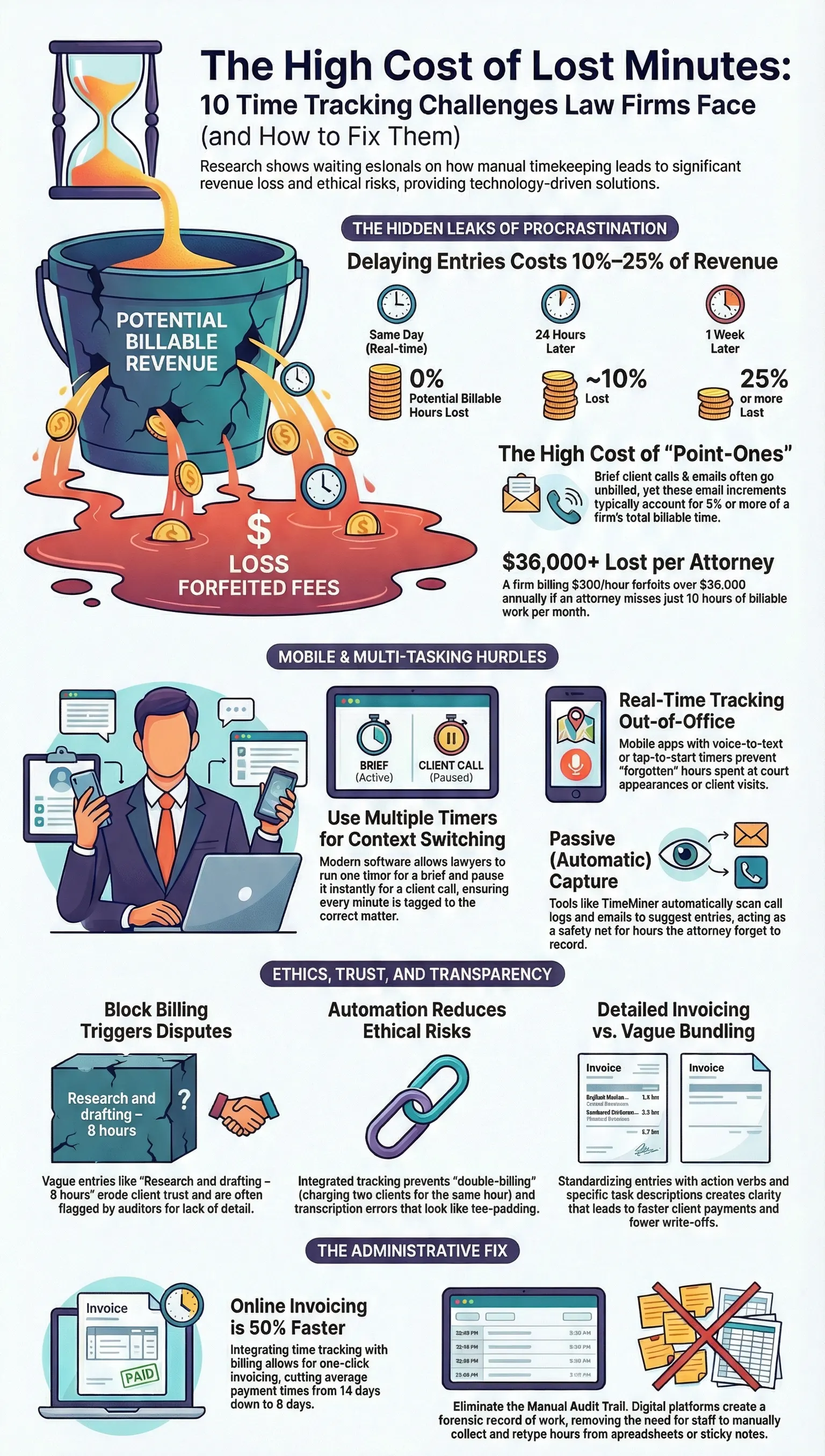
The challenge: Busy attorneys often put off entering time until the end of the day or week, relying on memory. Research shows that waiting just one day can lose about 10% of billable hours, and waiting a week can lose 25% or more. Reconstructing work from memory is error-prone, and even a few “fraction of an hour” entries (the so-called point-ones) routinely slip through the cracks. Over a year, these small misses add up to significant lost fees. For example, a firm billing $300/hour could forfeit over $36,000 per attorney per year on 10 hours of missed time.
How to fix it: Encourage immediate tracking. Adopt firm rules requiring attorneys to enter time within 24 hours of doing the work. Use real-time timers (desktop and mobile) so lawyers can start and stop a clock around each task. Automated reminders or daily check-ins can prompt anyone who has fallen behind. Finally, consider passive solutions: tools like Time Miner automatically surface suggested entries from your lawyers’ email and call logs, filling in gaps even when people forget. By capturing activities after the fact, these tools dramatically cut down on “lost” hours.
2. Manual, Memory-Based Tracking Errors
The challenge: Many firms still depend on handwritten notes, spreadsheets, or outdated systems. Relying on a lawyer’s memory or scribbled notes is inherently unreliable. Tasks get forgotten or logged inaccurately (a 5-minute phone call easily becomes “50” by accident). Manual entry also wastes extra (non-billable) time and offers no audit trail. In the worst case, ethical lapses can occur if errors go unchecked.
How to fix it: Go digital and automated. Use a legal time-tracking platform with built-in timers on both desktop and mobile devices. These systems let lawyers hit start/stop for each task rather than scribbling notes. Software automatically handles the required 6-minute increment math and avoids transcription mistakes. Even better, choose a tool that integrates billing, so recorded time feeds straight into invoices without retyping. This removes manual hand-offs and cuts admin work. Over time, these controls and confirmations (and built-in checks against double-entry) eliminate most human errors.
3. Overlooking Quick Communications and Tasks
The challenge: Routine billable work often hides in emails, phone calls, and quick questions. Things like a five-minute client call or a dozen related emails add up, but attorneys routinely skip logging them. One survey noted that quick tasks like brief calls, texts, or internal conferences are the top unbilled activities. Over time, these “point-one” increments can account for 5% or more of total billable time — essentially leaving money on the table.
How to fix it: Capture communications as part of timekeeping. Train lawyers to hit the timer even for short calls or emails, and set clear policies on billing increments (e.g. bill in tenths of an hour). Better yet, use tools that auto-capture billable activity. For example, Time Miner can automatically mine your firm’s email accounts and phone logs to suggest billable entries. It “surfaced billable calls and emails that never made it into our system,” one firm reported. By combining automatic timers with passive capture, firms ensure almost every minute of client-related work is logged.
4. Juggling Multiple Matters at Once
The challenge: Lawyers frequently switch contexts – answering a quick client call while working on another matter, or multitasking between files. Without the right tools, it’s easy to forget which matter each block of time belongs to. The more clients and cases you juggle, the more confusion and missed hours result.
How to fix it: Use a legal-specific tracker with multiple timers and project tagging. Modern platforms let attorneys name each matter or project they’re working on and add task codes. They can run one timer for a brief, pause it for a client phone call on another matter, then resume each timer as needed. At month’s end, all entries are automatically sorted by client and task. This removes guesswork – lawyers simply record what they were working on at the moment. Reporting tools can then show exactly how many hours were spent per client or case.
5. Tracking Time While Out of Office
The challenge: Court appearances, client visits, travel, and remote work make real-time tracking harder. Attorneys often jot down notes on paper or voice memos and hope to enter them later – but typically forget. One expert notes that without on-the-go tools, lawyers “may not have a right tool to record time entries on the go” and end up under-reporting their work. Lost time during the day can easily disappear by evening.
How to fix it: Equip lawyers with mobile tracking tools. A good system has a smartphone app or mobile interface that mirrors the desktop timer, so hours can be logged immediately from anywhere. Some apps even let you start timers by voice or quick taps on your phone. Alternatively, as with challenge, passive capture helps: if an attorney takes a billable call while driving, their phone’s call log is stored and can later be matched to a matter automatically. In short, give lawyers the means to record time in real time (even on their way out the door), and remind them to use it.
6. Billing Errors and Ethical Risks
The challenge: Inaccurate time entries can lead to unethical billing. Common mistakes like double-billing (charging two clients for the same hours) or block billing (lumping unrelated tasks into one vague line) undermine trust and can trigger complaints. Even innocent errors – e.g. mistyping a “5” as “50” minutes – look like padding when seen on an invoice. Firms face bar complaints or write-offs when clients dispute suspicious charges.
How to fix it: Automate and audit. With a good time-tracking system, conflict checks and alerts can catch double bookings before invoices go out. Encourage detailed entries: separate each distinct task and use clear descriptions so clients can “see how the time was spent”. Train attorneys on ethical billing standards. Automated tools can also format entries consistently, eliminating roll-ups like “8.5 hrs research & drafting” that clients hate. Finally, implement a review process: have supervisors spot-check time entries for red flags (extreme durations, repeat descriptions, etc.). These steps make billing transparent and compliant with ABA rules on fair fees.
7. Cumbersome Invoicing and Administrative Burden
The challenge: Manually converting timesheets into bills is labor-intensive. Designated staff often must collect dozens of time entries, format them into invoices, and send them to clients. This not only takes non-billable hours but also delays billing. In many small firms, invoices only go out weeks late, leading to cash-flow problems and write-offs when clients “question charges they don’t remember”.
How to fix it: Integrate timekeeping with billing. Choose software where one click can generate an invoice from tracked hours. For example, some systems auto-schedule draft invoices and send PDFs electronically, slashing weeks of administrative work. By automating the flow from time-entry to billing, you ensure clients get bills promptly (stats show online invoicing cuts average payment time from 14 days to 6). A smooth process also lets you quickly spot overdue payments and apply reminders. Over time, streamlined workflows free staff to focus on higher-value tasks, and bills get paid faster.
8. Vague or Inconsistent Time Entries
The challenge: Some attorneys lump multiple tasks into a single entry (“Research and drafting – 8 hours”). This block billing style may save time, but it leaves clients in the dark and invites pushback. Without standardized formats, one lawyer’s “telephone conference” might look very different from another’s “conf call – 0.5 hrs.” Inconsistent or jargon-filled descriptions erode trust and slow collections.
How to fix it: Standardize entries. Require that each activity be logged separately with an action verb and concise detail (e.g. “Reviewed and annotated draft contract – 1.2 hrs”). Provide templates or shortcut keys for common tasks to speed this up. Enforce uniform billing increments and description rules firm-wide. Many firms find that using a single software system for both case management and time entry enforces consistency automatically. Finally, have supervisors perform a quick check of every invoice – removing vague entries and ensuring compliance before the client sees it. These practices make invoices clearer and reduce disputes.
9. Outdated Tools and Processes
The challenge: Even with awareness of these issues, many firms drag their feet on technology. It is surprisingly common for lawyers to still rely on sticky notes, notebooks, or standalone spreadsheets. These ad-hoc methods lack audit trails and analytics. As one attorney put it, chaotic manual processes lead to both overbilling and underbilling – undermining profitability in either case.
How to fix it: Invest in modern time-tracking software. The right platform integrates with your practice management and accounting systems, so time entries and billing sync automatically. Look for features like multi-year historical analysis (for audits), mobile apps, and reporting dashboards. In fact, industry surveys show firms that increased tech spending see big gains. Adopting such tools makes tracking faster and more accurate. As one vendor notes, with an “automated legal time tracker” lawyers can simply click start/stop on tasks and let the software handle the rest. In short, upgrade old workflows to save time and capture every dollar earned.
10. Eroded Client Trust and Profitability
The challenge: Ultimately, poor timekeeping harms client relationships and firm growth. Law firms with billing errors or opaque invoices lose credibility – clients may withhold payment, demand write-offs, or even switch lawyers. Studies confirm that transparent, detailed billing builds trust and repeat business. In contrast, firms that only accept checks and delay invoices often struggle to collect; one report found firms offering online payments get paid over 50% faster.
How to fix it: Make accuracy and clarity a firm priority. By capturing all billable time and using clear entries, you create invoices clients readily understand and accept. Implement policies like electronic invoicing and multiple payment options to smooth collections. Celebrate gains: firms that recoup even a fraction of missed time free up revenue to reinvest in hiring or tech. (For example, recovering just one lost hour per week per attorney could add over $1,300 net per month.) Tools like Time Miner further boost trust by providing forensic records of every email and call used to generate each time entry. Clients see the evidence, and disputes vanish. In the end, disciplined time tracking protects the firm’s reputation and profitability alike.
Conclusion -
In today’s legal practice—whether a solo attorney or a large firm—addressing time tracking challenges is essential for profitability and efficiency. Research shows lawyers routinely lose hours of billable time to manual or incomplete tracking. Accurate, automated, real-time timekeeping recovers this lost revenue, eliminates human error, and frees attorneys to focus on clients.
Time Miner directly solves these challenges. Its automated system mines all calls, texts, and emails for billable work, ensuring no client interaction slips through the cracks. By capturing every minute of work without extra effort, It generates precise timesheets that improve billing transparency and maximize revenue collection.
Start a 30-day free trial to see Time Miner in action. Experience firsthand how automated time capture can boost your firm’s billing accuracy and profitability
Frequently Asked Questions
Q.1 : Why do lawyers often fall behind on time tracking?
A: Attorneys have billable work pressure and don’t want to interrupt their flow. Many postpone logging hours until later, but this leads to forgotten work and guessing. Studies show waiting a day or more to enter time can shortchange up to 25–30% of billable hours. The best practice is contemporaneous tracking – use timers and reminders – or tools that capture time automatically so nothing is missed.
Q 2: Can technology really recover “lost” billable time?
A: Yes. Modern legal time-tracking software can recapture hours lawyers didn’t log. For example, retroactive or passive trackers (like Time Miner) scan past emails, calendar events, and phone calls to suggest time entries. Firms report uncovering hundreds or thousands of dollars per month in previously missed entries. Automating this process ensures nearly 100% of client-related work is recorded, turning hidden minutes into billable revenue.
Q 3: What features should law firms look for in time-tracking software?
A: At minimum, get a solution with real-time timers, mobile apps, and strong reporting. It should integrate with your billing and accounting systems to automate invoicing. Ideal features include conflict-checking for double billing, customizable billing rules, detailed analytics, and, increasingly, passive tracking of emails/calls. Cloud-based tools also offer version control and audit trails, preventing the “multiple invoice versions” chaos some firms face. Anything that reduces manual steps and increases accuracy will pay dividends.
Q 4: How can we encourage attorneys to log time more diligently?
A: Cultivate a firm culture that values accurate billing. Set clear policies (e.g. hourly increments, same-day entry) and hold lawyers accountable. Reward good behavior – for instance, track who submits time promptly and recognize them. Training can help: show how easy software makes tracking and how lost minutes hurt bonus or profitability. Some firms gamify it or share metrics on missed time. In short, pair the right incentives with tools (and reminders) so timekeeping feels like part of the job, not a chore.
Q 5: What is passive (automatic) time tracking and why is it beneficial?
A: Passive tracking automatically captures work activity in the background—logging emails, calls, browser use, and documents without requiring manual timers. It helps lawyers record nearly all billable time, reduces administrative effort, and creates a complete audit trail. By ensuring even small tasks aren’t missed, it improves accuracy and boosts revenue capture.